
Everybody knows, Youtube is the large channel to post video. Everyone can post video there free. And if you do it well you can earn money from youtube. Now, We do not talk about how to make money from Youtube. We will talk about How to Add Google Voice to Youtube video without recorder.
Now, You can go to google translate. If you choose speaker icon after typing a word. You will hear a beautiful woman spells that word. I think, if you are not too good in English Lang. but You want to make a video by using English (or another Language), You can use that voice. Here is the step.
Step 1. Go to the page : http://soundoftext.com. You will see the page like this,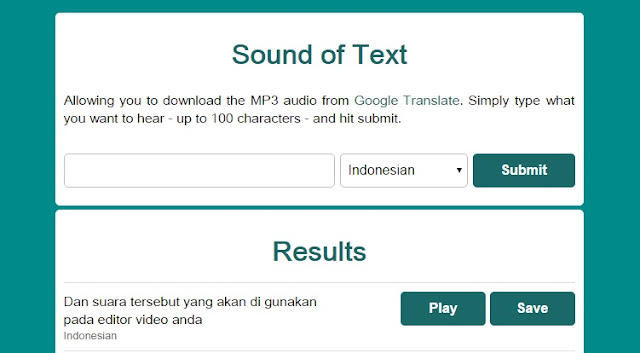
Step 2. Type the words in blank coloumn. Next, you can change the language.
Step 3. Press "Submit". Wait for a second.
Step 4. Take a look below. There is "Results". You can hear the woman says the word by pressing Play. If you like and want to use the sound. Please, Save. This sound will be saved in your computer as mp3. Next you only need to insert the that voice in your video editor.
Or you can watch this video. I think It will help you more.
How to Use 'Lady Google' Voice to Youtube Video Without Recorder
About Author


You must be logged in to post a comment.